


From HubSpot to Airtable to Inbox in Seconds: The No-Code Deal Sync Workflow, Explained
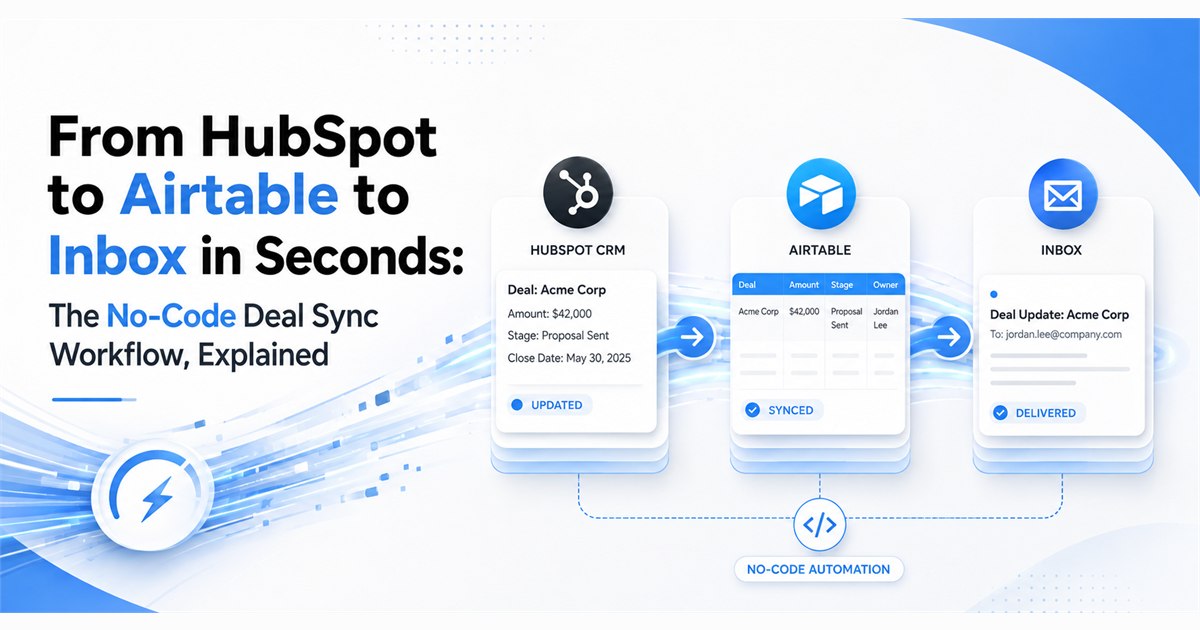
TL;DR – Sales teams close deals in HubSpot. Operations teams live in Airtable. Leadership wants email visibility. Most companies solve this with a brittle Zapier chain and shared API keys pasted into config files. This workflow does the same job on QuantumDataLytica – five composable Quantum Machines, one visual pipeline, credentials stored in a managed vault, and a runtime you can monitor per step.
- Trigger: A new deal is created or updated in HubSpot.
- Sync: Deal name, stage, amount, pipeline, and close date land in Airtable as a structured record.
- Notify: A confirmation email fires to the account owner with the deal details and the Airtable row link.
- Secure: Every credential – HubSpot token, Airtable API key, Gmail OAuth – is pulled from Password Vault at runtime, never hardcoded.
Why This Workflow Matters
Every growth-stage company hits the same wall. The CRM is the source of truth for the sales team, but the rest of the business – finance, customer success, operations – needs the same data reshaped, enriched, and delivered on a different cadence.
The usual answers all have failure modes:
- Zapier / Make.com chains – quick to build, but pricing scales per task, and multi-step logic gets expensive fast. Credentials sit inside individual “Zaps” with no central rotation policy.
- Native HubSpot integrations – limited to a handful of blessed apps, and rarely include the exact fields your Airtable base needs.
- A custom Node or Python script on a cron – flexible, but now you own the server, the retries, the logging, the secret rotation, and the pager duty when it breaks at 2 a.m.
QuantumDataLytica sits in the middle. You get the visual, no-code composition of a Zapier – with the reliability, observability, and secret management of a real data platform. Each block in the workflow is a Quantum Machine: a versioned, reusable microservice that either ships from the QDL Marketplace or your team publishes to the Developer Hub.
The Workflow at a Glance
Here is the full pipeline as it appears inside the QDL Data Factory canvas. Five machines, wired left-to-right, each with its own runtime metrics visible on the block itself.
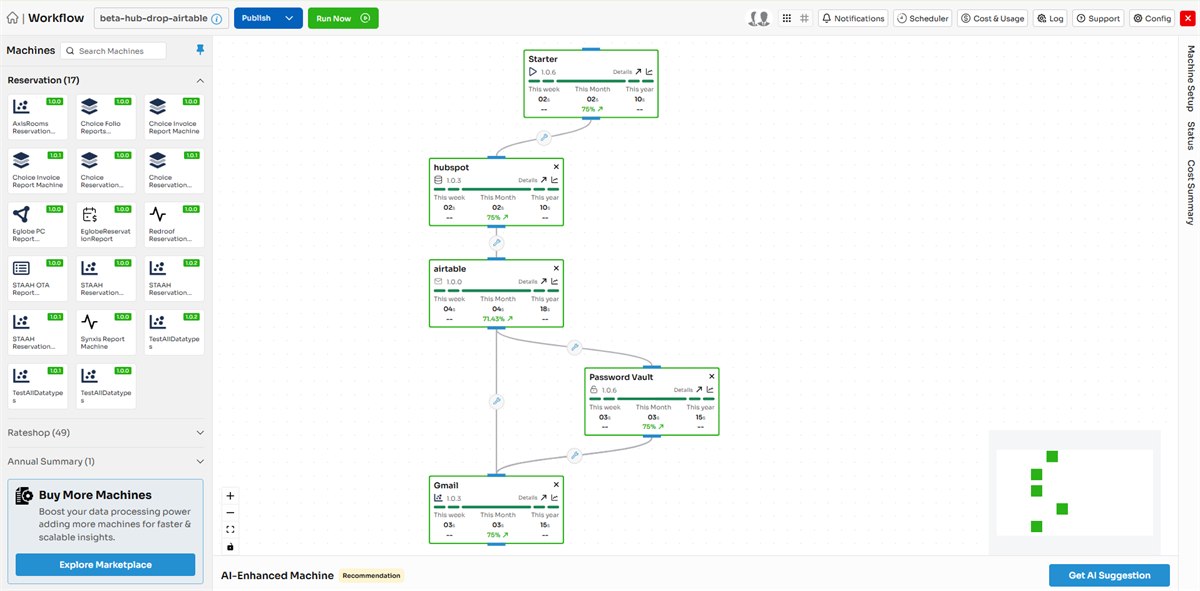
Figure 1 – The beta-hub-drop-airtable workflow in the QuantumDataLytica Data Factory. Each block shows the machine name, version, and runtime consumption for the week, month, and year.
The canvas itself is the documentation. Every node exposes its version (1.0.6, 1.0.3, 1.0.0), its success rate for the current window, and the compute it has consumed. If a run fails, the offending block turns red and clicking it opens the log – no separate observability tool to configure.
Machine by Machine: What Each Block Does
The five machines below are the entire workflow. Each one is independently versioned and can be swapped, forked, or upgraded without touching the others.
| Machine | Version | Role in the Workflow |
|---|---|---|
| Starter | 1.0.6 | Fires the pipeline. Can be triggered on a schedule, a webhook, or manually from the canvas. Passes an execution context to the next block. |
| HubSpot | 1.0.3 | Authenticates with the HubSpot API and pulls the deal payload – name, stage, amount, pipeline ID, close date, owner, and any custom properties you map. |
| Airtable | 1.0.0 | Writes the deal payload as a new row into your Airtable base. Handles field mapping, type coercion, and duplicate detection by HubSpot deal ID. |
| Password Vault | 1.0.6 | Not part of the linear flow – it sits alongside and serves credentials to any machine that requests them. HubSpot token, Airtable key, and Gmail OAuth all resolve here at runtime. |
| Gmail | 1.0.3 | Sends a confirmation email to the deal owner with the deal summary and a deep link back to the new Airtable record. |
1. Starter – the trigger you never have to babysit
The Starter machine is the entry point for every QDL workflow. In this build it is configured to run on a five-minute HubSpot polling cadence, but the same block accepts webhook triggers, calendar schedules, or manual runs from the Data Factory canvas.
Because Starter is a Quantum Machine like any other, its runtime is visible on the block – a two-second average execution. If it stops firing, the alert surfaces at the pipeline level, not buried in a cron log on some server nobody remembers.
2. HubSpot – the deal extractor
The HubSpot machine handles the entire API round-trip: authentication via the token supplied by Password Vault, the GET request against the Deals endpoint, pagination if there is more than one page of results, and payload normalization into a stable JSON shape the next machine can consume.
The fields returned in this workflow include:
- Deal name and unique HubSpot deal ID
- Deal stage (e.g., Qualified, Proposal Sent, Closed Won)
- Amount and currency
- Pipeline identifier (Sales, Renewals, Partnerships)
- Expected close date and last modified timestamp
- Deal owner ID (resolved downstream for the Gmail step)
# Sample HubSpot machine output (JSON)
{
  "deal_id": "8471902355",
  "deal_name": "Softqube - Annual Renewal Q4",
  "stage": "Proposal Sent",
  "amount": 48000,
  "currency": "USD",
  "pipeline": "sales-primary",
  "close_date": "2026-11-30",
  "owner_email": "vicky.l@softqube.co"
}
3. Airtable – the operational system of record
The Airtable machine takes the normalized deal payload and creates or updates a row in a configured Airtable base and table. Field mapping is defined once in the machine’s config panel – HubSpot property names on the left, Airtable field names on the right – and stored as versioned configuration alongside the workflow itself.
Two behaviours worth calling out:
- Idempotency by design. The machine keys off the HubSpot deal ID, so re-running the workflow on the same deal updates the existing Airtable row rather than creating a duplicate. This matters the first time you replay a day of history.
- Type coercion. HubSpot returns amounts as strings and dates as ISO-8601. The machine casts them into Airtable’s Number and Date field types before the write, so you do not end up with a base full of “48000” strings that cannot be summed.
4. Password Vault – the credential layer everyone forgets to build
Notice how the Password Vault block sits off the main line – it is not a step, it is a service. Any machine in the workflow can request a secret by name (hubspot_token, airtable_api_key, gmail_oauth_refresh), and the Vault resolves and delivers it at runtime.
Why this matters: rotating a compromised HubSpot token in a Zapier setup means editing every Zap that touches HubSpot. In this workflow you rotate it in one place – the Vault – and every machine that requests it on the next run gets the new value automatically. No redeploy, no downtime, no forgotten integration.
Password Vault also enforces access control. Machines request secrets by name, but the Vault decides whether a given workflow is entitled to a given credential. A rogue workflow copied from a template cannot silently harvest production keys.
5. Gmail – the human-in-the-loop signal
The last machine sends a confirmation email to the deal owner. The subject line, body template, and recipient logic all live inside the machine’s configuration – no separate SendGrid account, no HTML file checked into a git repo somewhere.
# Gmail machine config (email template)
to:      {{ hubspot.owner_email }}
subject: New deal synced: {{ hubspot.deal_name }}
body:    |
  Hi {{ hubspot.owner_first_name }},

  Your HubSpot deal has been synced to Airtable.

  Deal:   {{ hubspot.deal_name }}
  Stage:  {{ hubspot.stage }}
  Value:  ${{ hubspot.amount }}
  Close:  {{ hubspot.close_date }}

  View in Airtable: {{ airtable.record_url }}
Two seconds after the deal lands in Airtable, the email is in the owner’s inbox. No polling delay, no digest-tomorrow-morning batch – the workflow completes end-to-end in under fifteen seconds from Starter to Gmail on a typical run.
What This Replaces, and What It Unlocks
This is a small workflow – five machines, one purpose – but the pattern it encodes is the same one that shows up in every RevOps stack we have seen.
| Approach | What Breaks | What QDL Replaces It With |
|---|---|---|
| Zapier / Make chain | Per-task pricing at scale; credentials scattered across steps; no central rotation. | Flat compute pricing; one Vault; versioned machine configs. |
| Custom Node.js cron | You own the server, the retries, the logging, the on-call. | Managed runtime with per-step metrics and native retry policies. |
| Native HubSpot → Airtable | Limited field mapping; no email step; no way to extend. | Full field control; drop in Gmail, Slack, or any other machine. |
| Do nothing (manual copy) | Ops team burns hours a week on transcription; deals get missed. | Fifteen seconds end-to-end, zero human touch. |
Once this pattern is live, the interesting move is to fork it. The same five-machine skeleton – Trigger → Extract → Store → Notify, with Vault serving credentials – becomes the template for:
- Salesforce opportunities to a Postgres warehouse with a Slack alert.
- Stripe invoices to a finance base with a monthly digest email.
- Zendesk tickets to Notion with a routing notification to the on-call engineer.
- Hotel PMS bookings to a central BI database with a rate-anomaly alert – the pattern that anchors our hospitality use cases.
The compounding value: every new workflow reuses the same machines. Once your team publishes an internal “Slack Alert” machine or a “Postgres Writer” machine to the Developer Hub, every future workflow gets it for free – versioned, monitored, and secured under the same Vault.
This is the same platform-services principle behind Proxy as a Service and Compute as a Service: build the capability once, in the platform, and let every workflow inherit it.
Ready to Compose Your First Workflow?
Every workflow on QuantumDataLytica starts the same way: pick a machine, drop it on the canvas, configure it, connect the next one. The beta-hub-drop-airtable example in this post is a template you can fork today.
- Explore the Marketplace
- Request a demo
- See the wider Quantum DataFactory platform
Talk to us at info@quantumdatalytica.com or +1 (512) 733-3085.
FAQs
No. Every machine in this workflow - Starter, HubSpot, Airtable, Password Vault, and Gmail - is available in the QDL Marketplace and configured through visual forms in the Data Factory. You write code only if you want to publish a custom Quantum Machine of your own via the Developer Hub.
Environment variables live on a single server and rotate only when someone remembers to redeploy. Password Vault is a runtime credential service - machines request secrets by name at execution time, secrets rotate in one place, and access is controlled per-workflow. It is the difference between hardcoding a password and using a proper secrets manager.
The HubSpot machine has native retry and back-off policies. A failed run is marked in the canvas with the error visible on the block itself, the next scheduled run picks up the missed deal via the last-modified timestamp, and the Gmail step never fires with incomplete data. You do not silently write half a record into Airtable.
Yes. Drop the machine from the sidebar onto the canvas, wire it into the pipeline, and configure. The Marketplace includes machines for Slack, Stripe, Clearbit, Segment, Snowflake, and several dozen others. If the machine you need does not exist, the Developer Hub lets your engineering team publish one in Python.
QDL uses pay-as-you-go pricing based on compute consumption. A small workflow like this one, running every five minutes, consumes a fraction of a cent per run. The pricing panel on your workflow shows exact cost per execution and cumulative spend for the week, month, and year.
A Python script gives you flexibility but leaves you owning the infrastructure - hosting, scheduling, retries, logging, secret rotation, alerting. QDL wraps all of that around your logic so the only thing you configure is the business behaviour. When something breaks, you look at the block that turned red on the canvas, not at a CloudWatch dashboard.
Workflow edits are versioned and change-tracked. Team members can view any workflow, and edit permissions are controlled at the organization level. Every edit produces a new workflow revision, so rollback to a known-good state takes one click.
The five machines used in this build - Starter, HubSpot, Airtable, Password Vault, Gmail - are all available in the Marketplace. You can either compose them yourself in the Data Factory, or clone the beta-hub-drop-airtable template that ships as a starting point. Contact info@quantumdatalytica.com or request a demo for a walkthrough.

Nitin Suvagiya is the Architect and Lead Developer of the Quantum-Core-Engine at Quantum Datalytica, driving advanced workflow automation and data analytics solutions. As a DevOps-certified engineer, he specializes in cloud automation, CI/CD pipelines, Kubernetes, and scalable infrastructure. His expertise in software architecture and machine development ensures seamless deployment, high-performance computing, and optimized workflows. Nitin plays a crucial role in building intelligent, data-driven solutions that empower businesses with efficiency, reliability, and innovation in Quantum Datalytica’s ecosystem.
Recent Blogs
-
Workflow Automation 29 Sep, 2026
Build Once, Run Everywhere: Reusable Data Pipelines with QuantumDataLytica
-
Data Management Innovations 22 Sep, 2026
No-Code ETL vs Traditional ETL: The Definitive 2026 Comparison
-
Workflow Automation 09 Sep, 2026
Clinical Trial & IVD Data Automation: Automating Compliant Pipelines End-to-End
-
Personalized Learning 03 Sep, 2026
From One Spreadsheet to Ten Study Plans
-
Workflow Automation 26 Aug, 2026
From HubSpot to Airtable to Inbox in Seconds: The No-Code Deal Sync Workflow, Explained