


From One Spreadsheet to Ten Study Plans
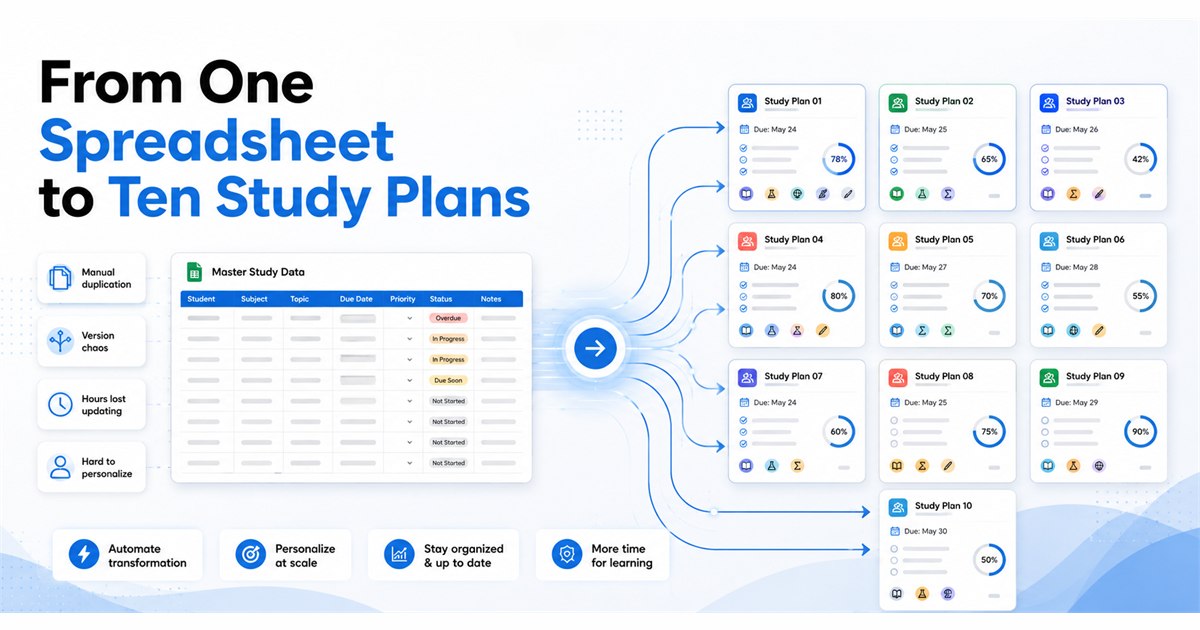
In short – Most educators are not short on learner data; they are short on the time it takes to turn that data into individual guidance for every student.
LearningAI reads the learner information you already keep in a spreadsheet, considers each learner on their own terms, and creates a personalized study plan for every one: what to focus on, where they are struggling, how to use their available time, and what to watch for.
In the example here, it reviewed 10 learners across 30 topic records, sorted them into three groups – Performing Well, Progressing Normally, and Needs More Attention – and delivered the results as one organized report.
The Personalization Challenge
Most educators are not short on information. Somewhere in a spreadsheet sits a remarkably complete picture of every learner: how they are scoring, which topics they have finished, which they have started, which they have not touched, where they keep slipping, how well earlier material is sticking, and how close the next exam is.
The difficulty has never been collecting that information. It is turning it into a clear answer to a deceptively simple question, asked once for every single learner: what should this person study next?
For a tutor with five students, that answer lives comfortably in their head. For a program with fifty, or five hundred, it does not. Reading each row, weighing one learner’s weak areas against another’s approaching exam, and writing genuinely different guidance for each of them is slow, careful work – and it is the work that gets compressed, generalized, or skipped when time runs short. So the spreadsheet stays full of signal, and learners often receive advice built for the group rather than for them.
Why the Same Plan Does Not Fit Two Learners
Consider three learners on the same roster.
- One is performing well. Blanket revision wastes their time; what helps them is maintaining momentum and strengthening a few selected areas so their strong position holds.
- Another is progressing normally but has soft spots. What helps them is not a full reset – it is targeted revision on the specific topics starting to wobble, before those cracks widen.
- A third needs more attention. They do not need more material thrown at them; they need clearer priorities – a straight answer about which weak or unfinished topics come first, and which can wait.
Give all three the same study plan and at least two of them are poorly served. Personalization is not a nicety here. It is the difference between advice a learner can act on and advice they will ignore.
What Learner Data Can Tell Us
The information educators already keep is more useful than it often looks. Each detail answers a practical question about a learner – and together they build the picture LearningAI reads.
| Learner Information | The Question It Helps Answer |
|---|---|
| Performance | How is this learner doing overall? |
| Progress | How far through the material are they? |
| Scores | Where are results strong, and where are they slipping? |
| Weak areas | Which specific topics or skills need work? |
| Retention | Is earlier material sticking, or fading? |
| Pending tasks | What is still outstanding? |
| Completed topics | What can we build on with confidence? |
| In-progress topics | What is underway and needs to be carried through? |
| Pending topics | What has not been started yet? |
| Exam urgency | How soon does this learner face a high-stakes assessment? |
| Available study time | How many hours can they realistically commit? |
None of this is new to educators. The value comes from reading all of it together, for one learner at a time – which is exactly what is hard to do by hand across a full roster.
How LearningAI Looks at Each Learner Individually
The heart of the approach is simple: LearningAI considers every learner on their own terms.
Instead of sorting the roster by a single score or treating the class as an average, it looks at each learner’s full picture – what they have completed, what is in progress, what is still pending, where they are weak, how well they are retaining, how close their next exam is, and how much time they actually have – and asks the questions an attentive educator would ask:
- What should this learner study next?
- Where are they struggling?
- What deserves attention first?
- How should their available study time be used?
- Are they ready for an upcoming exam?
- What risk should an educator be aware of?
Because every learner’s answers are different, every learner’s plan is different. A strong learner short on time gets a plan that protects their lead without overloading them. A struggling learner with an exam approaching gets a plan that names what to fix first and what to set aside for now.
The Three Learner Groups
To make a whole roster easy to act on at a glance, LearningAI also sorts learners into three groups. The groups are not grades – they are a way of seeing, quickly, who needs what kind of support.
| Group | What It Signals | What Tends to Help |
|---|---|---|
| Performing Well | Strong and on track | Maintain momentum and strengthen a few selected areas. |
| Progressing Normally | Steady, with a few soft spots | Targeted revision on the topics starting to wobble. |
| Needs More Attention | Facing pressure or falling behind | Clearer priorities around weak or unfinished topics. |
The grouping gives an educator a fast read on the class. The individual plans give them something specific to do about it.
What a Personalized Study Plan Contains
Each learner’s plan is built to be acted on, not just read. Every plan includes:
- Study priorities – the handful of things this learner should focus on first.
- Recommended actions – concrete next steps rather than general encouragement.
- Time allocation – how to spend the hours they actually have.
- Revision plan – how to sequence and revisit weak areas.
- Risks to watch – the specific way this learner could slip, so an educator can step in early.
Put together, that is a plan a tutor could hand to a learner, walk through with a parent, or use to prioritize their own attention across a full group.
A Closer Look: 10 Learners, 30 Topic Records
To show what this looks like in practice, LearningAI reviewed a sample set: 10 learners across 30 topic records.
Each of the ten learners was considered individually and given their own study plan. All ten were then sorted into the three groups – Performing Well, Progressing Normally, and Needs More Attention – so the whole set could be understood at a glance, while each learner kept a plan built specifically for them.
The example is not remarkable for its size. It is remarkable because ten learners produced ten different plans – which is exactly the point.
What Educators Receive
The end result is not a dashboard to interpret or a data export to clean up. It is a single, organized report, delivered in Google Docs and structured the same way every time, so it is easy to navigate.
The report contains two things:
- An overall analysis – how the roster breaks down across the three groups, and what stands out.
- An individual study plan for every learner – their priorities, recommended actions, time allocation, revision plan, and risks to watch.
Because it arrives as a clean document, an educator can open it, read it, share it with a colleague or a parent, and act on it right away.
The idea in one line: learner information in a spreadsheet → LearningAI understands each learner → a personalized study plan for each → one organized report.
Who This Approach Is Useful For
Any team responsible for helping more learners than one person can track by hand:
- Tutoring companies – individual weekly guidance for every student, not one generic plan.
- EdTech teams – a way to turn the learner data they already hold into personalized study plans.
- Schools and administrators – an early read on which learners need attention before a term slips away.
- Learning and development teams – the same approach applied to employees working toward certifications or new skills.
Why Personalized Recommendations Matter
Learning is personal, but guidance often is not. When everyone receives the same plan, strong learners spend time on things they have already mastered, and struggling learners get buried under advice that never tells them where to start.
Personalized recommendations close that gap. They meet each learner where they actually are: protecting momentum for those ahead, tightening the soft spots for those on track, and bringing clarity to those who need it most. The information to do this usually already exists. What has been missing is a practical way to turn it into individual guidance for every learner – which is precisely what this approach makes possible.
See It on Your Own Learner Data
LearningAI can take the learner information you already have and help turn it into useful, individualized study plans – for every learner, in one organized report.
Request a demo to see it run against a sample of your own roster, or explore the wider QuantumDataLytica platform and customer use cases.
Talk to us at info@quantumdatalytica.com or +1 (512) 733-3085.
FAQs
It reviews the learner information you already keep, considers each learner individually, and produces a personalized study plan for every one - along with an overall view of the whole group.
The learner details educators typically track: performance, progress, scores, weak areas, retention, pending tasks, completed, in-progress and pending topics, exam urgency, and available study time.
No. It works from learner information held in a Google Sheet - the kind of record many educators already maintain.
It looks at each learner's full picture and answers practical questions: what to study next, where they are struggling, what deserves attention first, how to use their time, and what to watch for. Different pictures lead to different priorities.
Performing Well, Progressing Normally, and Needs More Attention give a quick read on who needs what kind of support, so an educator can prioritize attention across a whole roster.
No. Each plan is built for that specific learner - which is why the ten learners in the example produced ten different plans.
Study priorities, recommended actions, time allocation, a revision plan, and risks to watch.
A single organized report in Google Docs: an overall analysis of the group plus an individual study plan for each learner, ready to read, share, and act on.

Nitin Suvagiya is the Architect and Lead Developer of the Quantum-Core-Engine at Quantum Datalytica, driving advanced workflow automation and data analytics solutions. As a DevOps-certified engineer, he specializes in cloud automation, CI/CD pipelines, Kubernetes, and scalable infrastructure. His expertise in software architecture and machine development ensures seamless deployment, high-performance computing, and optimized workflows. Nitin plays a crucial role in building intelligent, data-driven solutions that empower businesses with efficiency, reliability, and innovation in Quantum Datalytica’s ecosystem.
Recent Blogs
-
Workflow Automation 29 Sep, 2026
Build Once, Run Everywhere: Reusable Data Pipelines with QuantumDataLytica
-
Data Management Innovations 22 Sep, 2026
No-Code ETL vs Traditional ETL: The Definitive 2026 Comparison
-
Workflow Automation 09 Sep, 2026
Clinical Trial & IVD Data Automation: Automating Compliant Pipelines End-to-End
-
Personalized Learning 03 Sep, 2026
From One Spreadsheet to Ten Study Plans
-
Workflow Automation 26 Aug, 2026
From HubSpot to Airtable to Inbox in Seconds: The No-Code Deal Sync Workflow, Explained