

Quantum-CLI: A powerful CLI to build, run, and test Quantum Machines.

Execute Your Workflow in a Loop with QuantumDataLytica
QuantumLoop is a powerful enhancement to our no-code data automation platform.

QuantumDataLytica vs Traditional ETL Tools: Accelerate Your Data Integration Without Coding
Traditional Extract, Transform, Load (ETL) tools have long been at the core of data integration practices.
QuantumDataLytica: The No-Code Alternative to Traditional ETL
For years, ETL (Extract, Transform, Load) solutions have been the cornerstone of data integration.
Sync your CRM to Google Drive Automatically
Automatically export your CRM data as CSV files to Google Drive—no manual exports, no copy-paste. This no-code workflow pulls records from any REST API, generates a CSV file, and uploads it to your chosen Google Drive folder on the schedule you set.
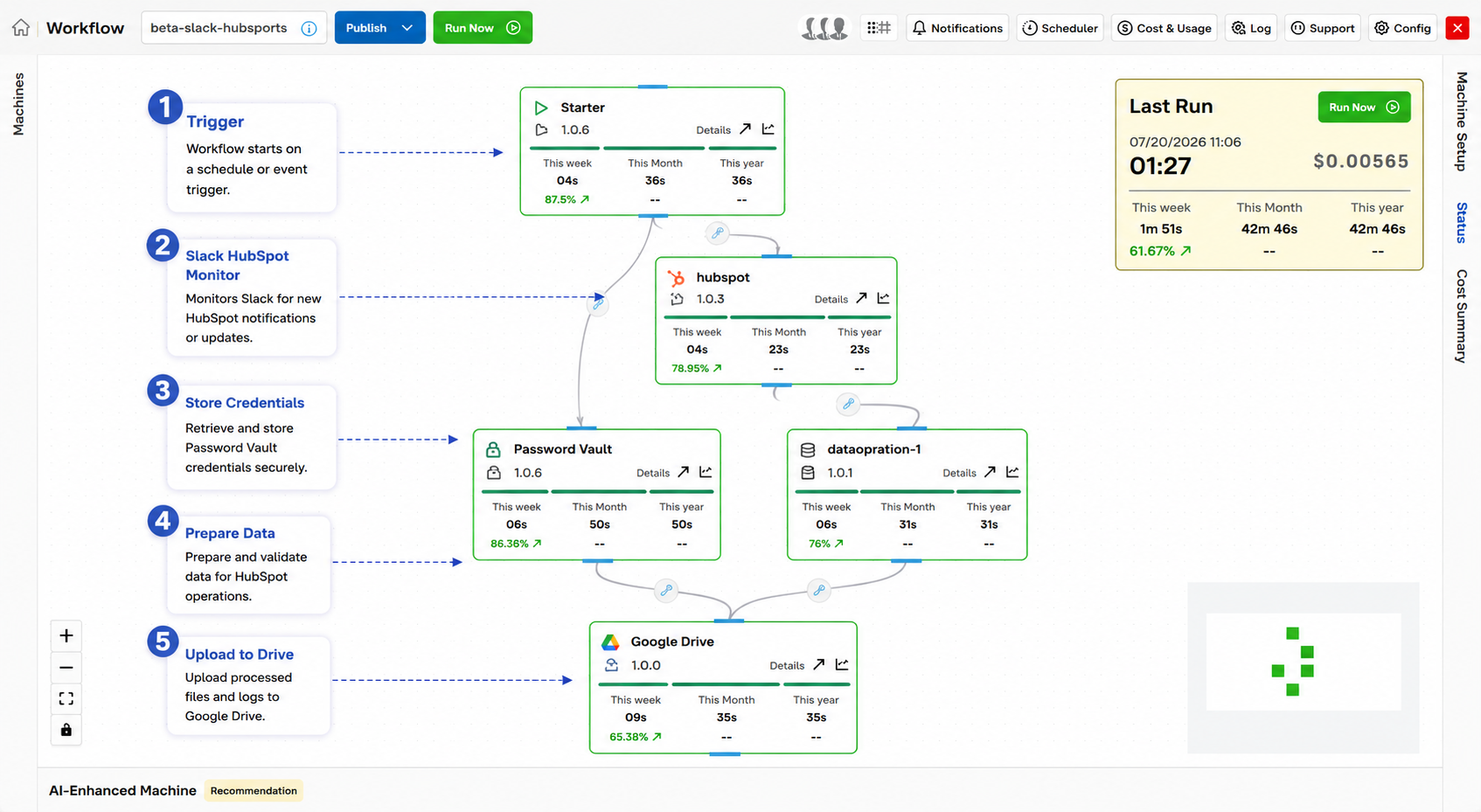
From manual exports to automated CSV backups
If your team still exports CRM data to CSV and pastes it into Google Drive every morning, you already know the cost: stale numbers, human error, and hours lost to a task a machine should own. A CRM to CSV files stored in Google Drive removes that manual step entirely by connecting your CRM's REST API directly to a live spreadsheet.
Stop pasting CSVs every morning. Connect your CRM's API straight to a sheet that keeps itself current.
This guide walks through what an automated CRM sync does, how the pipeline works step by step, and how to build it in minutes on QuantumDataLytica - our no-code data automation platform. Because it runs on reusable Quantum Machines assembled in a visual Workflow Designer, you can connect an API to Google Drive without writing a single line of code or standing up any infrastructure.
The result is a spreadsheet that refreshes itself on the schedule you choose - hourly, nightly, or on demand - so sales, ops, and leadership are always looking at the same current numbers.
Why automate this workflow
What you gain when sync CRM to Google Drive runs on autopilot instead of by hand.
Zero manual exports
Records flow from your CRM API straight into the sheet. No downloads, no re-imports, no stale copies floating around in email.
Deduplicated & timestamped
Built-in dedupe logic on a unique key (e.g. user ID) prevents duplicate rows, and every sync writes a timestamp for clean auditing.
Set the cadence you need
Run hourly for live dashboards or nightly for daily reporting. Change the schedule any time from the Workflow Designer - no redeploy.
How it works, step by step
Trigger the scheduler
A cron job fires on your configured hourly or daily schedule to start the sync run.
Fetch data from the API
The API Integration machine calls your CRM or REST endpoint and retrieves all current user or entity records, handling authentication and pagination.
Deduplicate against the sheet
Existing rows are checked against a unique identifier so only genuinely new or changed records move forward.
Upload CSV to Google Drive
New records are appended to the designated sheet tab, each stamped with a sync timestamp for monitoring and audit.
Inputs & outputs
REST API JSON response - user/entity records from your CRM or a public API endpoint
Appended rows in the designated Google Drive tab, with a timestamp log on every run
Scheduled (hourly or daily cron)
API key or OAuth token as required by the source API
Best practices
Field-tested guidance for running this pipeline reliably in production.
- Use a unique identifier field (e.g. user ID) for deduplication so repeated syncs never create duplicate rows.
- Store the API base URL and credentials as environment variables - never hard-code secrets in the workflow.
- Add an error-handling branch that sends an alert if the API returns a non-2xx status code.
- Log the row count and sync timestamp on every successful run to support monitoring and audit.
- Test your field mapping thoroughly before production, especially if the source API schema can change.
From CRM chaos to a single source of truth
A revenue team running weekly pipeline reviews replaced their Monday-morning CSV export ritual with this template. The CRM now syncs to Google Drive every hour, feeding a live dashboard the whole team trusts. Because QuantumDataLytica bills pay-as-you-go and needs no infrastructure, the automation paid for itself in the first week of reclaimed analyst time.
Expected outcome
Your CRM and customer data stays continuously up to date in Google Drive - with zero manual export or data entry.
Frequently asked questions
Can you automate Google Drive from an API?
How do I sync my CRM to Google Drive automatically?
Will it create duplicate rows every time it runs?
Do I need to write code or install anything?
How often can the sync run?
Build sync CRM to Google Drive in minutes - no code
Assemble this workflow from reusable Quantum Machines in the visual Workflow Designer. Pay-as-you-go, no infrastructure to manage.