

Quantum-CLI: A powerful CLI to build, run, and test Quantum Machines.

Execute Your Workflow in a Loop with QuantumDataLytica
QuantumLoop is a powerful enhancement to our no-code data automation platform.

QuantumDataLytica vs Traditional ETL Tools: Accelerate Your Data Integration Without Coding
Traditional Extract, Transform, Load (ETL) tools have long been at the core of data integration practices.
QuantumDataLytica: The No-Code Alternative to Traditional ETL
For years, ETL (Extract, Transform, Load) solutions have been the cornerstone of data integration.
Scheduled API data collection to AWS S3
Continuously poll any live API and store timestamped records in AWS S3 - automatically building a growing historical dataset for analytics and machine learning. This no-code template runs on the schedule you set, using the CoinGecko crypto API as a ready-made example.
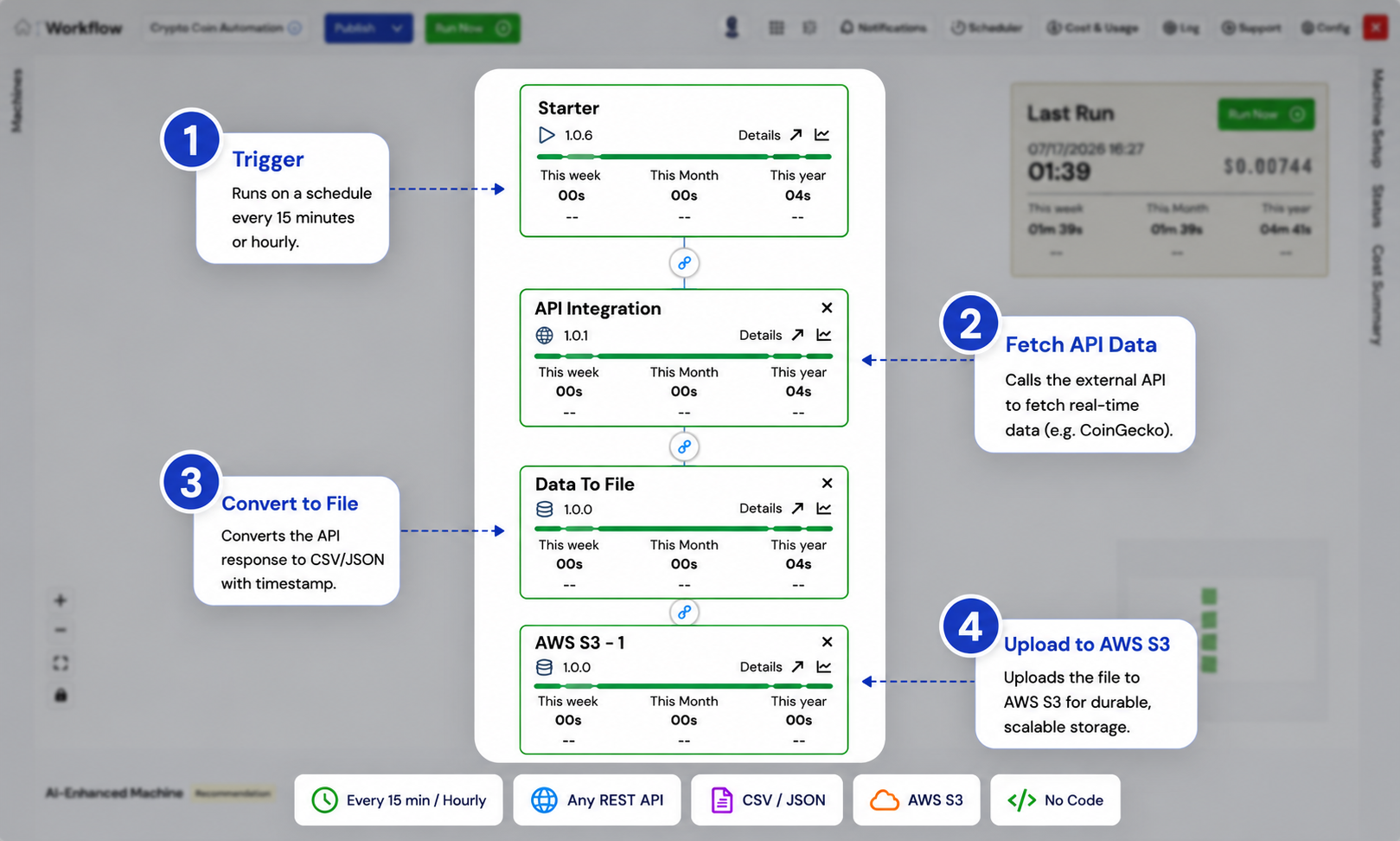
Capture data you can't back-fill later
Some of the most valuable datasets don't exist yet - you have to capture them over time. Live prices, sensor readings, exchange rates, inventory levels: none of it can be back-filled later. If you're not collecting it now, that history is gone. Scheduled API data collection solves this by polling an API at a fixed interval and durably storing each snapshot.
Poll any API on a schedule and build a growing, query-ready archive in S3 - automatically.
This guide explains how automated API-to-S3 collection works and how to build it without code on QuantumDataLytica. The example uses the CoinGecko API to capture cryptocurrency prices, but the same pipeline works for any REST endpoint - weather, stock quotes, IoT telemetry, or your own internal services. Each run appends a timestamped record and pushes it to AWS S3, giving you a clean, query-ready historical archive.
Because the whole flow is assembled from reusable Quantum Machines in a visual designer, you get a production-grade collection pipeline - scheduling, file handling, and cloud upload - without provisioning a single server.
Why automate this workflow
What you gain when scheduled API data collection runs on autopilot instead of by hand.
Build history you can't buy
Every run captures a point-in-time snapshot. Over days and weeks you accumulate a proprietary dataset ready for analytics or model training.
Durable, query-ready storage
Records land in AWS S3 with a consistent key naming convention (year/month/day/timestamp) so they partition cleanly for Athena and downstream pipelines.
Rate-limit aware
The template respects API rate limits and adds exponential backoff on HTTP 429, so collection keeps running reliably on the free or paid tier.
How it works, step by step
Trigger the scheduler
A cron job fires every 15 minutes or hourly, as configured, to start the collection cycle.
Call the external API
The API Integration machine fetches real-time data (e.g. crypto prices for your chosen coins) from the source endpoint.
Validate the payload
An empty or error response is caught before it can produce a bad file - no junk data reaches storage.
Write to a timestamped file
The Data To File machine appends the record to a CSV or JSON buffer for the current batch, adding a collection timestamp.
Upload to AWS S3
The file is pushed to your designated S3 bucket and prefix path for durable, scalable cloud storage.
Inputs & outputs
API JSON response - e.g. CoinGecko real-time prices for configured coin identifiers
Timestamped CSV or JSON files stored in your designated AWS S3 bucket
Scheduled (every 15 minutes or hourly cron)
AWS IAM role or access key/secret for S3; API key for the source (if required)
Best practices
Field-tested guidance for running this pipeline reliably in production.
- Respect the source API's rate limits (CoinGecko free tier is ~10-50 calls/min) and add exponential backoff retry logic for HTTP 429 responses.
- Use a consistent S3 key naming convention such as year/month/day/timestamp.csv to enable efficient partitioning and Athena querying.
- Apply S3 Lifecycle Policies to archive or expire older files and keep storage costs under control.
- Validate the response payload before writing - an empty or error response should never produce a file or trigger an upload.
- Monitor S3 storage consumption and set CloudWatch alarms to detect unexpected upload failures.
A self-building dataset for analytics and ML
Data and analytics teams use this template to stand up historical datasets fast. Instead of a one-off engineering project, they point the pipeline at an API, set a 15-minute cadence, and let it accumulate a partitioned S3 archive that feeds BI dashboards and model training. With QuantumDataLytica's pay-as-you-go pricing, collection scales with data volume - no fixed infrastructure to maintain.
Expected outcome
A continuously growing historical dataset lands in AWS S3 automatically - ready for analytics pipelines or machine learning workloads.
Frequently asked questions
What is a data pipeline?
Can I collect data from an API other than CoinGecko?
How do I store API data in S3 without code?
How often should the collection run?
Will an API error corrupt my dataset?
Build scheduled API data collection in minutes - no code
Assemble this workflow from reusable Quantum Machines in the visual Workflow Designer. Pay-as-you-go, no infrastructure to manage.