

Quantum-CLI: A powerful CLI to build, run, and test Quantum Machines.

Execute Your Workflow in a Loop with QuantumDataLytica
QuantumLoop is a powerful enhancement to our no-code data automation platform.

QuantumDataLytica vs Traditional ETL Tools: Accelerate Your Data Integration Without Coding
Traditional Extract, Transform, Load (ETL) tools have long been at the core of data integration practices.
QuantumDataLytica: The No-Code Alternative to Traditional ETL
For years, ETL (Extract, Transform, Load) solutions have been the cornerstone of data integration.
Automated hotel rate shopping
Revenue managers shouldn't spend their mornings checking competitor prices by hand. This on-demand template pulls hotel rates from Booking.com, normalizes them into a clean schema, and appends them to a Google Sheets tracker - giving your team competitive rate intelligence without the manual lookups.
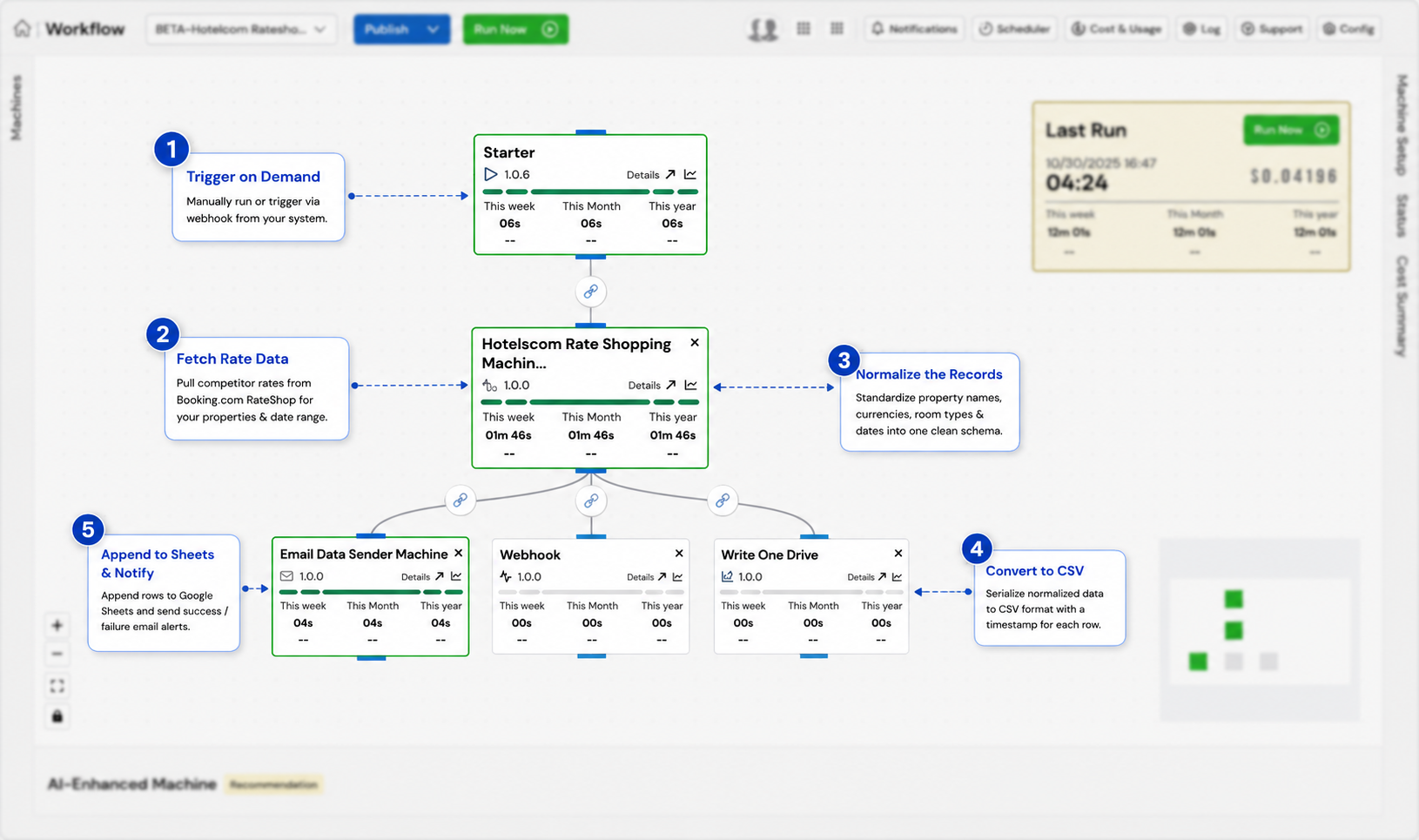
See the whole market, clearly
In hospitality, price is the lever that moves occupancy and RevPAR - but only if you can see the market clearly. Manually checking a competitive set on Booking.com across multiple dates is slow, error-prone, and out of date the moment you finish. Hotel rate intelligence automates that lookup so revenue managers always have current competitor pricing at hand.
Pull the comp set on demand, normalize it, and build a pricing history revenue managers can trust.
This guide covers how automated rate shopping works and how to run it on QuantumDataLytica without code. On demand - triggered manually or by a webhook from your platform - the workflow calls the Booking.com RateShop integration for your defined properties and date range, normalizes property names, currencies, room types, and dates into a consistent schema, and appends every rate to a Google Sheets tracker with a timestamp, preserving a full history for trend analysis.
Hospitality is where QuantumDataLytica runs deepest - powering rate shopping, PMS data standardization, and occupancy forecasting for properties at scale. This template is the entry point to that stack: competitive pricing intelligence, automated and always current.
Why automate this workflow
What you gain when hotel rate intelligence runs on autopilot instead of by hand.
No more manual rate checks
One trigger pulls competitor rates for every property and date you care about - replacing hours of tab-by-tab checking on Booking.com.
Normalized and comparable
Currencies, room types, property names, and date formats are standardized into one schema, so you're comparing like with like across your whole comp set.
A full pricing history
Rates are appended - never overwritten - so your tracker builds a time series revenue managers can use to spot trends and defend pricing decisions.
How it works, step by step
Trigger on demand
A user runs the workflow manually, or a webhook fires it automatically from a configured platform event.
Fetch hotel rate data
The Booking.com RateShop machine retrieves pricing for the specified properties and date range.
Normalize the records
Property names, currencies, room types, and date formats are standardized into a single consistent schema across all sources.
Convert to a CSV file
The normalized rate records are serialized to a structured CSV, with a timestamp column added to every row.
Append to Google Sheets & notify
Rows are appended to your tracking sheet, preserving history, and a success or failure alert is emailed to the revenue team.
Inputs & outputs
Your configured property list and target date range; Booking.com RateShop access
Normalized competitor rate rows appended to the Google Sheets tracker; email notification sent
On demand (manual trigger or webhook event from a connected platform)
Booking.com RateShop credentials; Google Sheets API access; Gmail for notifications
Best practices
Field-tested guidance for running this pipeline reliably in production.
- Validate the date-range parameter before calling the RateShop API - reject empty or invalid ranges before incurring API cost.
- Apply currency normalization when properties span markets, converting all rates to a standard base currency.
- Always append to Google Sheets - never overwrite existing rows - so the full historical record is preserved for trend analysis.
- Send both a success notification (with record count) and a failure alert (with error detail) to keep the revenue team informed.
- For high-frequency demand, schedule automatic triggers during off-peak hours to reduce manual effort.
Purpose-built for hospitality revenue teams
Hospitality is QuantumDataLytica's strongest vertical, with production automations spanning rate shopping, PMS data standardization, sentiment analysis, and occupancy forecasting across hundreds of properties. Revenue managers use this rate intelligence template as the first building block: pull the comp set, drop it in Sheets, and feed it into forecasting and pricing models - all without a data engineering team.
Expected outcome
Competitor hotel rates are captured on demand and appended to your tracking sheet - no manual price checking or data entry required.
Frequently asked questions
What is hotel rate shopping?
How does automated rate intelligence work?
Can I trigger it automatically instead of manually?
Does it keep a history of rates over time?
Do I need engineers to set this up?
Build hotel rate intelligence in minutes - no code
Assemble this workflow from reusable Quantum Machines in the visual Workflow Designer. Pay-as-you-go, no infrastructure to manage.