

Quantum-CLI: A powerful CLI to build, run, and test Quantum Machines.

Execute Your Workflow in a Loop with QuantumDataLytica
QuantumLoop is a powerful enhancement to our no-code data automation platform.

QuantumDataLytica vs Traditional ETL Tools: Accelerate Your Data Integration Without Coding
Traditional Extract, Transform, Load (ETL) tools have long been at the core of data integration practices.
QuantumDataLytica: The No-Code Alternative to Traditional ETL
For years, ETL (Extract, Transform, Load) solutions have been the cornerstone of data integration.
Save email attachments to Google Drive
Every morning, incoming reports arrive as CSV or Excel attachments - and someone has to download and re-upload them by hand. This no-code template does it for you: it reads qualifying emails, validates the attachment, and files it in Google Drive with a clean date-stamped name.
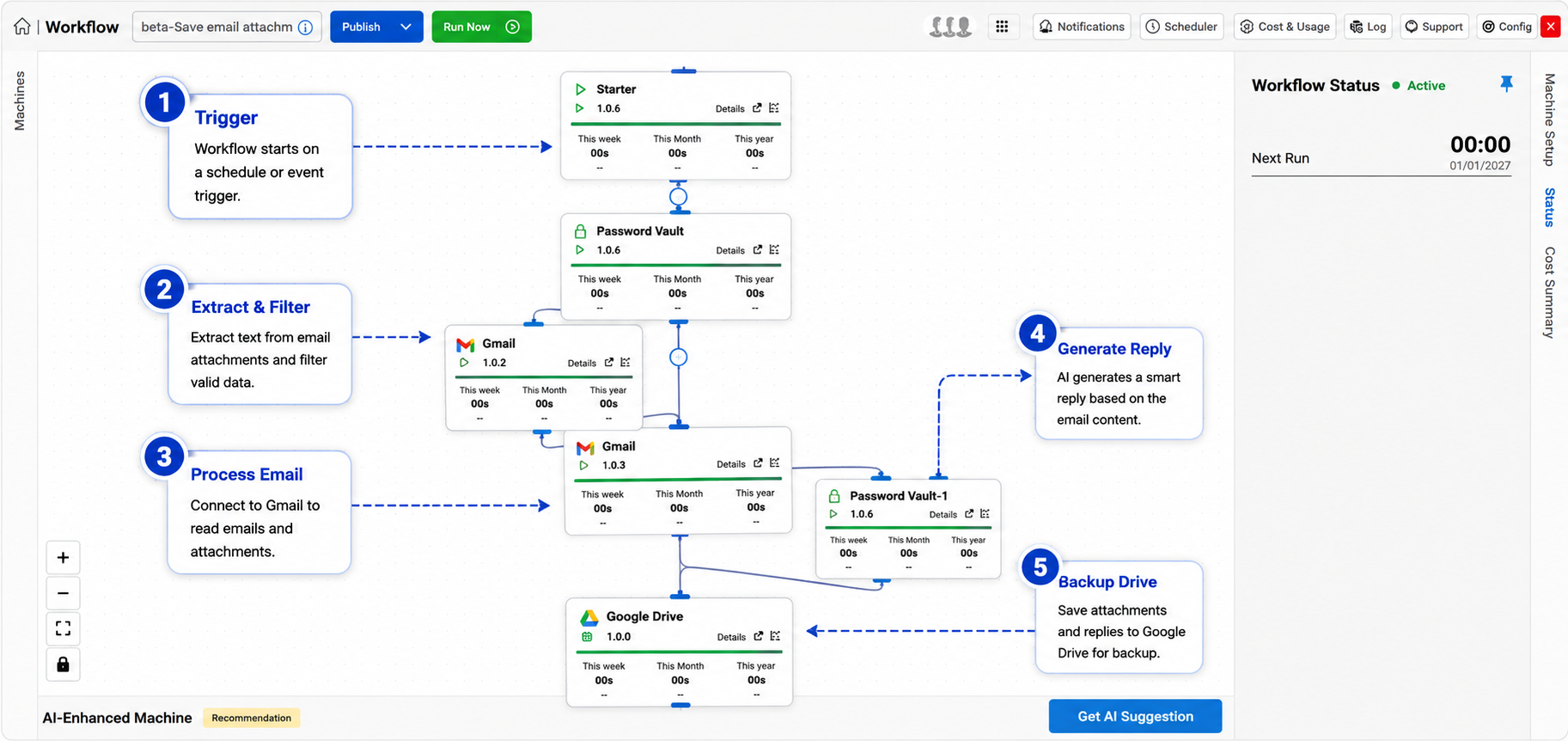
End the morning download chore
Recurring reports have a way of arriving as email attachments - a daily sales CSV from a partner, an overnight export from a vendor system, a spreadsheet from a field team. Individually each one takes a minute to download and re-file. Multiplied across senders and days, it becomes a standing chore that's easy to forget and easy to get wrong.
Attachments move from inbox to Drive on their own - validated, date-stamped, and confirmed.
This guide shows how to save email attachments to Google Drive automatically with a no-code pipeline on QuantumDataLytica. The workflow polls your inbox on a morning schedule, extracts the CSV or Excel file from any email that matches your subject filter, validates it, and drops it into a designated Drive folder with a consistent date-stamped filename - then sends a confirmation with the file link.
It's the kind of small, reliable automation that quietly removes an entire category of manual file management - and because it's built from reusable Quantum Machines, there's nothing to host or maintain.
Why automate this workflow
What you gain when save email attachments to Google Drive runs on autopilot instead of by hand.
No more manual downloads
Attachments move from inbox to Drive on their own. Nobody has to remember to save the daily file, and nothing gets missed on busy mornings.
Validated before it lands
Each attachment's headers, row count, and data types are checked first, so malformed files are rejected and logged instead of quietly corrupting your folder.
Organized and searchable
Consistent YYYY-MM-DD filenames keep the Drive folder tidy and easy to search, and a confirmation email gives you the file link every time.
How it works, step by step
Trigger the scheduler
A morning cron job fires and starts the email polling routine to check for new inbound messages.
Fetch email & attachment
The Email machine reads the latest email matching your subject filter and extracts the CSV or Excel attachment.
Parse & validate the file
Headers, row count, and data types are validated to confirm the file is well-formed before it's uploaded.
Upload to Google Drive
The validated file is saved to your designated Drive folder using a date-stamped filename for traceability.
Send confirmation
A notification email confirms the successful upload and includes the Drive file link.
Inputs & outputs
Inbound email with a CSV or Excel attachment matching your configured subject filter
Date-stamped file saved in the designated Google Drive folder; confirmation email sent
Scheduled (daily morning cron)
Gmail OAuth credentials; Google Drive API access for the target folder
Best practices
Field-tested guidance for running this pipeline reliably in production.
- Define a specific subject filter (e.g. "Daily Report") so the workflow ignores irrelevant or spam messages.
- Include a validation step that rejects malformed attachments before they reach Drive, and log each rejection with its reason.
- Apply a consistent date-stamped filename format (e.g. YYYY-MM-DD_ReportName.csv) to keep the folder organized and searchable.
- Handle the no-email case gracefully - log the miss and exit cleanly rather than erroring when nothing qualifies.
- Send a failure notification if the upload step fails, so the source team knows to resend.
The end of the morning download ritual
Operations teams that receive daily data feeds by email use this template to eliminate the download-and-upload routine entirely. Files land in Drive validated and named consistently, ready for the next workflow to pick up. Paired with QuantumDataLytica's other templates, the saved file can trigger a downstream sync - turning a manual chore into the first step of a fully automated pipeline.
Expected outcome
Daily reports and data feeds received by email land in Google Drive automatically - zero manual download, upload, or file management required.
Frequently asked questions
How do I automatically save email attachments to Google Drive?
Can it filter which emails to process?
What happens if the attachment is malformed?
Does it work with Excel files as well as CSV?
What if no qualifying email arrives one day?
Build save email attachments to Google Drive in minutes - no code
Assemble this workflow from reusable Quantum Machines in the visual Workflow Designer. Pay-as-you-go, no infrastructure to manage.