


Compute as a Service: Dedicated VMs for Workflow Execution
TL;DR
- A shared compute pool is fine for light, infrequent workflows – but heavy ETL, ML training, forecasting, and scheduled Python jobs need capacity that doesn’t vanish under peak load.
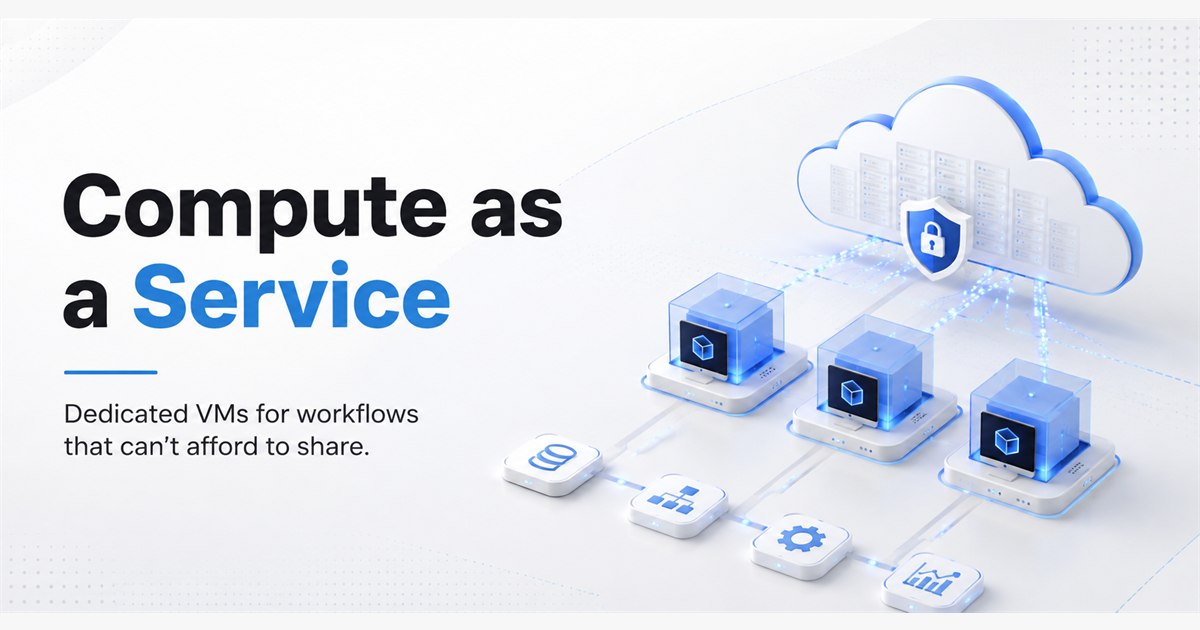
- Compute as a Service lets you provision a dedicated virtual machine on QuantumDataLytica, choose the CPU, memory, and storage, and pin it to specific workflows.
- The VM runs 24/7 and stays attached, so scheduled and event-driven workflows always execute against the same, predictable environment.
- Compute stops being a separate infrastructure concern and becomes part of the workflow configuration itself.
When Shared Compute Stops Being Enough
Every data platform starts on shared compute. It’s the sensible default – a common pool absorbs bursty loads, keeps costs low, and works fine while workflows stay small and infrequent.
The trouble starts when production workloads mature. A rate-shopping pipeline goes from hourly to every five minutes. A forecasting workflow starts training on twelve months of history instead of one. An AI enrichment step lands in a hot path. Suddenly the same shared pool that used to feel plentiful is being asked to serve heavier jobs, more often, against sharper SLAs.
The failure mode is rarely a clean crash. It looks like this: a forecasting job that used to run in eleven minutes now takes forty; a scheduled ETL misses its window twice a week; an ML inference batch gets evicted mid-run when a heavier neighbour spins up. Engineering blames the schedule. Ops blames the model. Nobody blames the actual cause, which is that every workflow is quietly competing for the same finite pool of resources.
QuantumDataLytica’s Compute as a Service is the answer to that specific problem – not for every workflow, but for the ones that have outgrown the shared pool.
What Compute as a Service Actually Is
Compute as a Service lets a user provision a dedicated virtual machine directly from inside the QuantumDataLytica platform. You select the compute configuration – CPU, memory, storage – and QuantumDataLytica provisions the VM against that spec.
Once provisioned, the VM runs continuously. It doesn’t sleep between jobs and doesn’t re-hydrate on each run. You then assign it to one or more workflows, and every execution of those workflows uses that VM as its compute environment. Everything else – the visual designer, scheduling, monitoring, nested workflows, quantum machines – continues to work exactly as before. The only thing that changes is where the workload runs.
The mental model is simple: a workflow is what you built in the Workflow Designer, the dedicated VM is the compute environment you provisioned, and every execution of that workflow runs against that exact environment.
Why Dedicated Compute Matters
Four outcomes change the moment a workflow moves off the shared pool and onto a dedicated VM.
1. Predictable runtime, not statistical runtime
On shared compute, the honest answer to “how long does this workflow take?” is “usually eleven minutes, sometimes forty, depends what else is running.” On dedicated compute, that answer stops being a distribution and starts being a number. That matters when the workflow feeds a downstream SLA – a rate refresh, a pricing decision, a scheduled report – that can’t politely wait for a noisy neighbour to finish.
2. Right-sized capacity, not one-size-fits-all
A light transformation and an ML training job don’t need the same environment, but on a shared pool they usually get one. Compute as a Service lets you provision an 8-core, 32 GB VM for the forecasting workflow and leave the rest of the platform on defaults. You size for the workload, not for the average.
3. Continuous availability for scheduled and event-driven work
The VM is up 24/7. That means a workflow scheduled every fifteen minutes, or a webhook-triggered pipeline that fires at 03:00, hits a warm environment every time. There’s no cold-start penalty, no queue behind a heavier tenant, no waiting for capacity to free up.
4. Compute becomes part of the workflow, not a separate ops concern
The compute environment is defined against the workflow, not managed as a separate infrastructure layer. Whoever owns the workflow owns the compute decision. That collapses a whole class of “works in dev, times out in prod” conversations into a single visible configuration.
How It Works, End to End
Four steps, in the order you actually take them.
- Select the compute configuration. Start from the workload, not the catalogue. If the forecasting job needs to hold a year of historical data in memory while a model trains, that’s roughly what the VM needs to provide. A useful starting profile: 4–8 CPU cores, 16–32 GB RAM, storage sized to the working dataset plus headroom.
- Provision the virtual machine. QuantumDataLytica provisions the dedicated VM against the selected spec. Once available, it is a persistent compute resource inside your environment – not a per-run container that disappears when the workflow ends.
- Assign the VM to one or more workflows. Bind the VM to the specific workflows that need it. Everything else in the platform continues to run against the shared pool. This is important: dedicated compute is opt-in per workflow, not an all-or-nothing switch.
- Execute the workflow. Every subsequent run of the bound workflow – scheduled, triggered, or manual – uses the assigned VM. The Workflow Designer, monitoring, quantum machines, and nested workflows behave identically. The only thing that changes is that the workload lands on capacity it doesn’t share.
Example: Forecasting Workflow on a Dedicated VM
Take a production sales forecasting workflow that trains against twelve months of history and runs every four hours. It might be bound to an 8-core VM with 32 GB of memory and 200 GB of SSD storage, available 24/7, running the same four quantum machines it always has: historical data loader, feature engineering, model training, and forecast publisher.
The workflow definition itself doesn’t change. The compute binding is the only new thing – and it’s the piece that turns “we hope this finishes in time” into “this finishes in a known window every time.”
Shared Compute vs Compute as a Service
When a team is deciding whether a workflow belongs on the shared pool or on its own VM, this is the honest comparison:
| Aspect | Shared Compute (Default) | Compute as a Service (Dedicated VM) |
|---|---|---|
| Resource guarantee | Best-effort; workloads share a common pool | CPU, memory, and storage reserved for the workflow |
| Execution predictability | Runtime varies with concurrent workloads | Consistent runtime under a defined config |
| Peak-hour behaviour | Contention slows or queues jobs | Isolated capacity – peak hours behave like off-peak |
| Best fit | Light transforms, infrequent jobs, prototypes | ML, forecasting, heavy ETL, scheduled Python, AI inference |
| Ops overhead | None – QDL manages the pool | None beyond selecting the config – QDL provisions and maintains the VM |
| Availability | Available when the platform has capacity | 24/7, always attached to the assigned workflows |
| Cost profile | Pay-as-you-go per operation | Predictable compute reservation for demanding workloads |
The takeaway isn’t “always use dedicated compute.” It’s that the two options serve different jobs, and putting a heavy production workflow on the wrong one is where reliability starts to erode.
Before and After, in One Picture
The clearest way to see the difference is to look at a real workflow under both models.
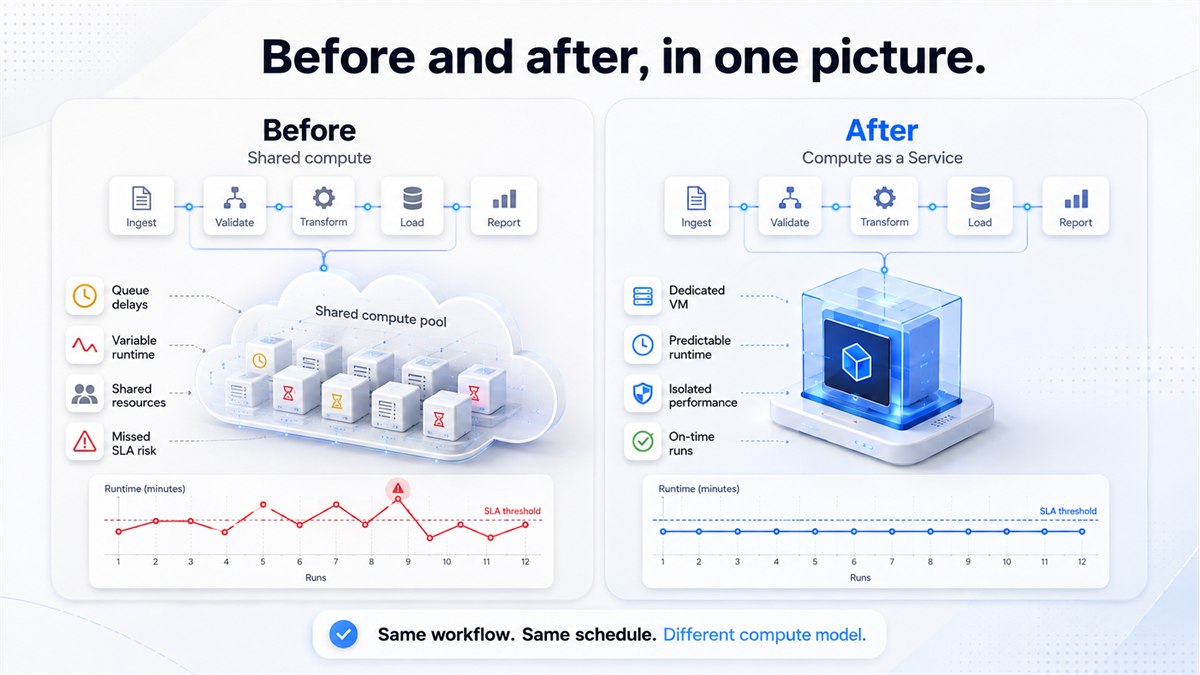
Same workflow, same machines, same schedule. The variable that changed was where it ran.
Where This Earns Its Keep: Hospitality Data Pipelines
QuantumDataLytica’s deepest production footprint is in hospitality – rate shopping, revenue management, sentiment analysis, switchboard automation – running across more than five hundred properties. Those workloads share a specific pattern: they run continuously, they’re rate-sensitive to competitor pricing, and a fifteen-minute freshness SLA is not a nice-to-have.
That’s the archetypal Compute as a Service workload. A rate-intelligence pipeline that fires every fifteen minutes across hundreds of properties can’t afford to be told “busy right now, try again in a bit.” Pinning it to a dedicated VM removes the neighbour-noise problem entirely. The same pattern applies to forecasting workflows that need to train against long history windows, and to sentiment models that need consistent GPU-adjacent throughput.
Where operators tend to reach for it first:
- Rate-intelligence pipelines running on sub-hour cycles across many properties.
- Forecasting workflows that train on long historical windows.
- ML/AI inference in the hot path of a customer-facing decision.
- Scheduled Python workloads that must finish inside a fixed window.
- Large data transformations that used to “usually” finish overnight.
When to Use It – and When Not To
The decision is genuinely binary in most cases.
Use Compute as a Service when
- The workflow is production-critical. A missed run has a visible downstream cost – stale rates, delayed forecast, missed report.
- Resource requirements exceed shared defaults. The workflow needs more CPU or memory than the shared pool is sized to guarantee under load.
- The workflow runs frequently or continuously. Sub-hour schedules, always-on webhooks, or long-running batch jobs benefit most.
- Predictable runtime matters more than raw peak throughput. Consistency is the goal, not the fastest possible single run.
- The workload is computationally intensive. ML training, forecasting, feature engineering at scale, AI inference.
Stay on shared compute when
- The workflow is lightweight. A daily CSV normalisation or a webhook that fires a few times an hour doesn’t need reserved capacity.
- The workflow is experimental. Prototypes and one-off analyses are cheaper to run against the shared pool.
- Runtime variance is tolerable. If it doesn’t matter whether the job finishes in three minutes or fifteen, the shared pool is the right home.
Compute That Belongs to the Workflow
The change Compute as a Service makes is small on paper and significant in practice. It says: the workflow and the compute environment it runs on are the same design decision. You pick the environment when you design the workflow, and the platform makes sure every execution honours it.
For teams running the heavy end of a data platform – ML, forecasting, high-frequency ETL, AI-in-the-hot-path – that’s the difference between a system that mostly meets its SLA and a system that meets its SLA on every cycle.
Your workflow. Your compute. Your resources.
This is Part 02 of our Platform Capabilities series. Part 01 covered Proxy as a Service – and why proxy management belongs in the platform, not your code.
Want to see dedicated compute against one of your own workflows? Request a demo, or start building on Quantum DataFactory and the Developer Hub.
Questions? Reach the team at info@quantumdatalytica.com or +1 (512) 733-3085.
FAQs
Two things. First, the VM is provisioned from inside the QuantumDataLytica platform, so there's no separate infrastructure account, no networking setup, and no glue code between compute and workflow. Second, the VM binds directly to workflows - the compute environment is part of the workflow configuration rather than an infrastructure layer you connect to it.
Yes. A VM can be assigned to one workflow or to many. Common patterns are one VM per critical workflow, or one VM per workload family - for example, a single dedicated VM serving every workflow in a forecasting suite.
Nothing changes. Compute as a Service is opt-in per workflow. Any workflow you don't explicitly bind to a dedicated VM continues to run against the shared pool exactly as it does today.
Yes. Compute configuration is meant to track the workload, so CPU, memory, and storage can be adjusted as requirements change. This matters most for workflows whose data volume grows over time.
Yes. The compute environment is orthogonal to workflow structure. QuantumLoop iterations, nested workflows, scheduled triggers, and event-driven triggers all execute against the assigned VM in the same way any other workflow does.
Real-time monitoring, execution history, and logs continue to work as they do for shared-compute workflows. The additional signal you get is per-VM resource utilisation, which is what lets you right-size the configuration over time.
No. Any workflow built in the QuantumDataLytica Workflow Designer - including workflows that call custom quantum machines authored in Python via the Developer Hub - can be bound to a dedicated VM. It's a compute-layer decision, not a language decision.
When the workflow is lightweight, experimental, or infrequent, and runtime variance doesn't hurt anything downstream. In those cases the shared pool is both simpler and cheaper. Compute as a Service earns its keep on the workflows where consistency is the product.

Nitin Suvagiya is the Architect and Lead Developer of the Quantum-Core-Engine at Quantum Datalytica, driving advanced workflow automation and data analytics solutions. As a DevOps-certified engineer, he specializes in cloud automation, CI/CD pipelines, Kubernetes, and scalable infrastructure. His expertise in software architecture and machine development ensures seamless deployment, high-performance computing, and optimized workflows. Nitin plays a crucial role in building intelligent, data-driven solutions that empower businesses with efficiency, reliability, and innovation in Quantum Datalytica’s ecosystem.
Recent Blogs
-
Workflow Automation 29 Sep, 2026
Build Once, Run Everywhere: Reusable Data Pipelines with QuantumDataLytica
-
Data Management Innovations 22 Sep, 2026
No-Code ETL vs Traditional ETL: The Definitive 2026 Comparison
-
Workflow Automation 09 Sep, 2026
Clinical Trial & IVD Data Automation: Automating Compliant Pipelines End-to-End
-
Personalized Learning 03 Sep, 2026
From One Spreadsheet to Ten Study Plans
-
Workflow Automation 26 Aug, 2026
From HubSpot to Airtable to Inbox in Seconds: The No-Code Deal Sync Workflow, Explained